11 Reasons Why You Should Use Google Tag Manager
Updated: May 1st, 2021
Let me guess how you landed on this page: you heard people around you talking about this tool called Google Tag Manager (GTM). Actually, you keep noticing this name more and more often in forums, various events, etc. Some say that it will help you track visitors much easier, while others promise that you won’t need developers anymore, you’ll be able to install tracking codes/pixels all by yourself.
In this article, I’ll explain why you should use Google Tag Manager and what it’s good for. In plain English.

Why use Google Tag Manager?
Here’s a quick summary. If you’re interested in learning about a particular reason, just click it.
- Fast deployment of tracking codes
- All tags are managed in one place
- Testing tools
- Reusable container templates (recipes)
- It’s free
- Simple (kind of) event tracking
- Tag templates
- Versions, workspaces, and environments
- Security
- User permissions
- The growing popularity and Friendly/Helpful Community
What is Google Tag Manager?
Before we dive deeper into why you should use Google Tag Manager, let me give you a quick overview of the tool itself.
Google Tag Manager is free software from Google that allows you to install various types of code (tags) to your website. Good examples of tags are Google Analytics tracking code, Google Analytics event codes, Google Ads conversion script, remarketing tags. There are many more types of code that can be added to your website using GTM, including custom codes.
Some people confuse Google Tag Manager with Google Analytics, asking which one should they use. Actually, the answer is that they should use both. In my other blog post, I explain what are the differences between Google Analytics and Google Tag Manager. So if you’re new to it, definitely check it out.

Prior to GTM, GA tracking codes had to be hard-coded, usually by a web developer on each individual page. Having hundreds of events is very difficult when it comes to maintaining/updating them. But Google Tag Manager solves this problem because all your tags are stored in one place, your GTM account.
Imagine Google Tag Manager like a toolbox, where you keep all your tools: a ruler (Google Analytics), a hammer (Google Ads), etc.
Google Tag Manager also lets you test your tags to make sure they are triggered when you load the right page or click a particular button. Another great benefit: you can change your tags and the way they work without actually changing the source code of your website (which you may not be able to do because of slow release cycles or busy schedule of developers) – instead you just edit tags in GTM user interface and publish changes with a click of a button.

Google Analytics is not the only tag compatible with Google Tag Manager. Other examples include:
- Google Ads Conversion Tag
- Google Ads Remarketing Tag
- Facebook Pixel code
- Crazyegg tracking code
- Any other custom HTML/Javascript code
If you’re interested in learning more about GTM, feel free to download the free guide by entering your email address in the form below.
Reasons why you should use Google Tag Manager
#1. Fast deployment of tracking codes
Let’s take a step back and remember the classic way of how tracking codes used to be managed:
- A marketer (analyst, or anyone else) decides to start using a new marketing platform to track user behavior.
- He/she get a tracking code and sends it to a developer.
- The developer says he’s busy and will do that next week.
- What if you need to track additional events? In that case, you’ll need to write a detailed task, send emails back-and-forth with the developer in order to get those codes installed. This can take even more than several weeks.
What if I said that you could avoid the developer (in most cases) and implement those tracking codes by yourself? With Google Tag Manager, this dream comes true.
Every tracking code is called a tag and you can manage them via GTM interface.
Google Tag Manager speeds up many processes. New tags can be added rapidly and a lot of them do not require code changes to the website. This is a great tool for marketers because it can really speed up launch time by testing each change themselves and deploying when ready.

And that’s exactly why I put this reason as #1 item in the list of reasons why you should use Google Tag Manager. But it’s definitely not the last.
#2. All tags are managed in one place
In the old days, when tag management was just an unknown term, all tracking codes were coded directly in the website’s/app’s source code. The worst part, those little pieces of JavaScript code snippets were scattered across different files. So if you needed to do a minor change, the developer had to: (1) find all those codes, (2) update them.
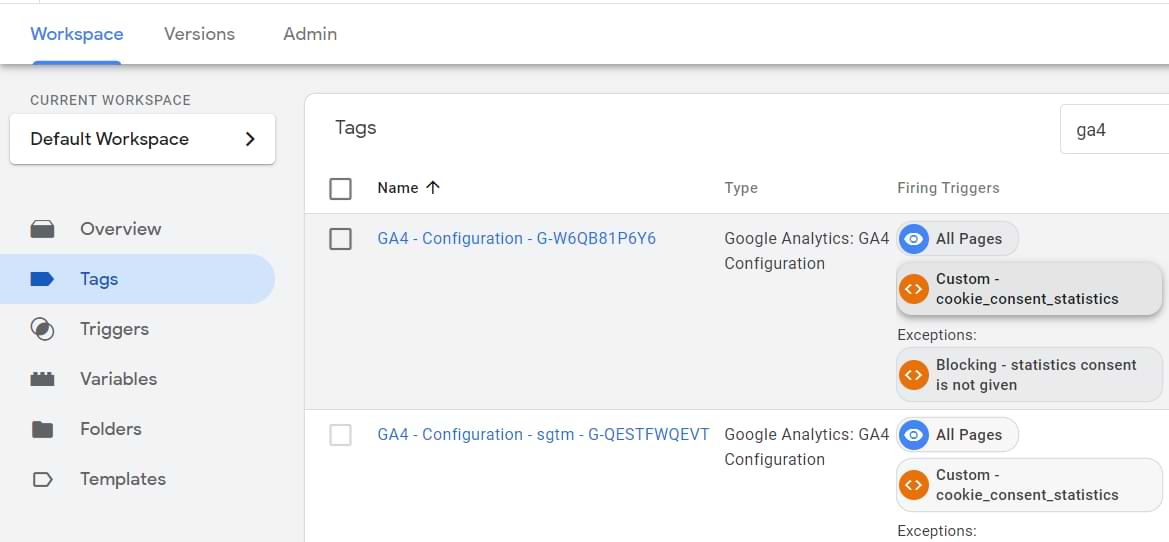
Thanks to GTM, this process is made easier: all tags are controlled in one place.
#3. Testing tools
Troubleshooting and correcting tag errors is simplified via Google Tag Manager Preview and Debug mode that shows which tags are fired on a page and which are not. It also includes information about triggers that fire tags and data contained within tracking tags.

Why is it important? With GTM debugging solutions, you’re making sure that your tags work before you publish them to the live site.
#4. Reusable container templates (recipes)
Another awesome reason why you should use Google Tag Manager is the possibility to export all tags, triggers, and variables into a single file (which can be imported later). What does it mean? Well, you can create your own templates with commonly used tracking codes/settings.
This is especially useful for agencies who have to implement standard Google Analytics events over and over again, e.g. page view tracking, outbound link clicks, etc.
In fact, this feature is so popular that my library of Free GTM Recipes (templates) is one of the most visited sections of this blog. Go ahead, click this link, download any template you like, follow instructions, and start tracking in minutes.
#5. It’s free
Nothing much to add here, actually. Just like Google Analytics, Google Tag Manager is free. Although there’s a premium version of it in Google Analytics 360 Suite, the free version is more than enough for a lot of business (small and medium).

#6. Simple (kind of) event tracking
As I have mentioned before, event tracking involves custom JavaScript codes that you have to add to a website to track events like clicks, form submissions, etc. To make things easier, Google Tag Manager comes with a feature called auto-event tracking.
Once you enable certain triggers in Google Tag Manager, they will start automatically listening to particular interactions on a web page. There is still some setup required, but it is relatively easy to do. You can use those interactions to fire tracking codes, e.g. Google Analytics Event Tag.
Basic events that you can track (by default) in GTM are based on:
- Clicks
- Link clicks
- Form submissions
- Time spent on a page, etc.
But wait, there’s more! Thanks to the growing community of GTM users and enthusiasts, the number of auto-event tracking functions constantly increases. You can also add custom features that record things such as scroll depth, new comments, and more.
Why is this important? Well, it empowers you to gain insight into what actions users take on your website. Are they engaging with the content? Are they filling in your forms? You can then use these events to create goals specific to your business needs in Google Analytics.
Comments
Post a Comment